

Define what makes a qualified lead
Choose criteria that influence the next sales action. A maintenance business might need the equipment type, location and urgency. An agency might ask about the service, buying timeframe and decision makers. Keep the conversation focused by starting with essential information and expanding when the answers justify it. Explain why a question helps when that is unclear. Qualification should help the prospect reach a relevant next step as well as helping your sales team.
Configure the AI agent in FunnelOps
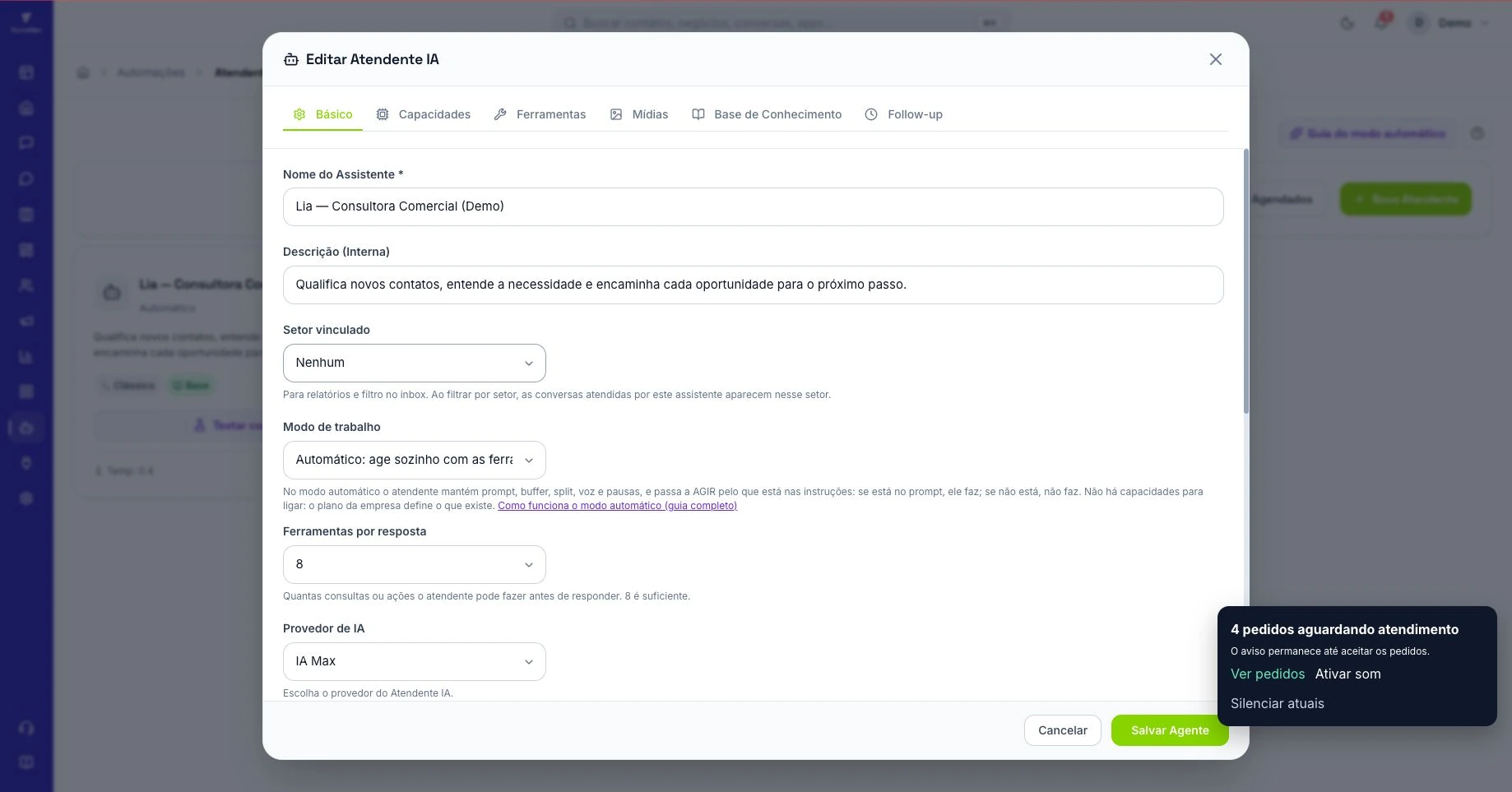
Open Automations, select AI agents and create a new agent. In Automatic mode, describe the purpose, priority questions and conditions that make a contact ready for sales. Include the names of the tags and Kanban stages used by your operation. Set clear instructions for requests that fall outside the target profile. This gives you concrete behavior to check during testing instead of relying on a general instruction to qualify every lead.
Give the agent usable business knowledge
Add texts, documents or links covering services, opening hours, service areas and approved terms. Identify information that changes often and assign someone to maintain each source. Explain when a quotation depends on an assessment. If the agent cannot find an answer, its next action should be to ask a question or transfer the conversation as appropriate. The knowledge base should describe the offer your team can actually deliver to customers.
Prepare a handoff with context
Review Transfer in the Basic tab and choose a queue, rotation or fixed owner according to your process. Agree with sellers on the information that should be recorded before a handoff. A maintenance seller might receive the equipment type, area, urgency and outstanding question. Check the conversation history when taking over. The AI pauses when a human assumes the conversation, allowing the seller to continue the negotiation with the existing context.
Test incomplete and unusual requests
Use Test conversation with representative scenarios, including short messages, questions asked out of order, discount requests and requests for a person. External actions in that environment are shown as what the agent would do, without performing the real operation. Check that it uses information already provided. Then validate the complete path with a demonstration contact, including handoff, permissions and opportunity records, before extending the configuration to more incoming conversations.
Measure quality and sales progress
Review a sample of conversations and how often sellers receive enough information to proceed. Open Activity on the agent card to inspect the timeline, tasks, numbers and review. Distinguish instruction, content and routing problems so you can fix the cause. Compare qualified-lead conversion against a previous period using equivalent criteria. The aim is better preparation for sales and a coherent experience for the person speaking with your business, supported by observable results.
A complete case: prioritizing technical service visits
Consider a fictional technical service company that handles commercial equipment in two cities. The SDR prepares a seller's assessment without promising a price or visit before review. Four details change the decision: equipment type, service city, reported problem and stated urgency. The company name and preferred callback time help continuity, but should not become a barrier for someone who can only send a short message.
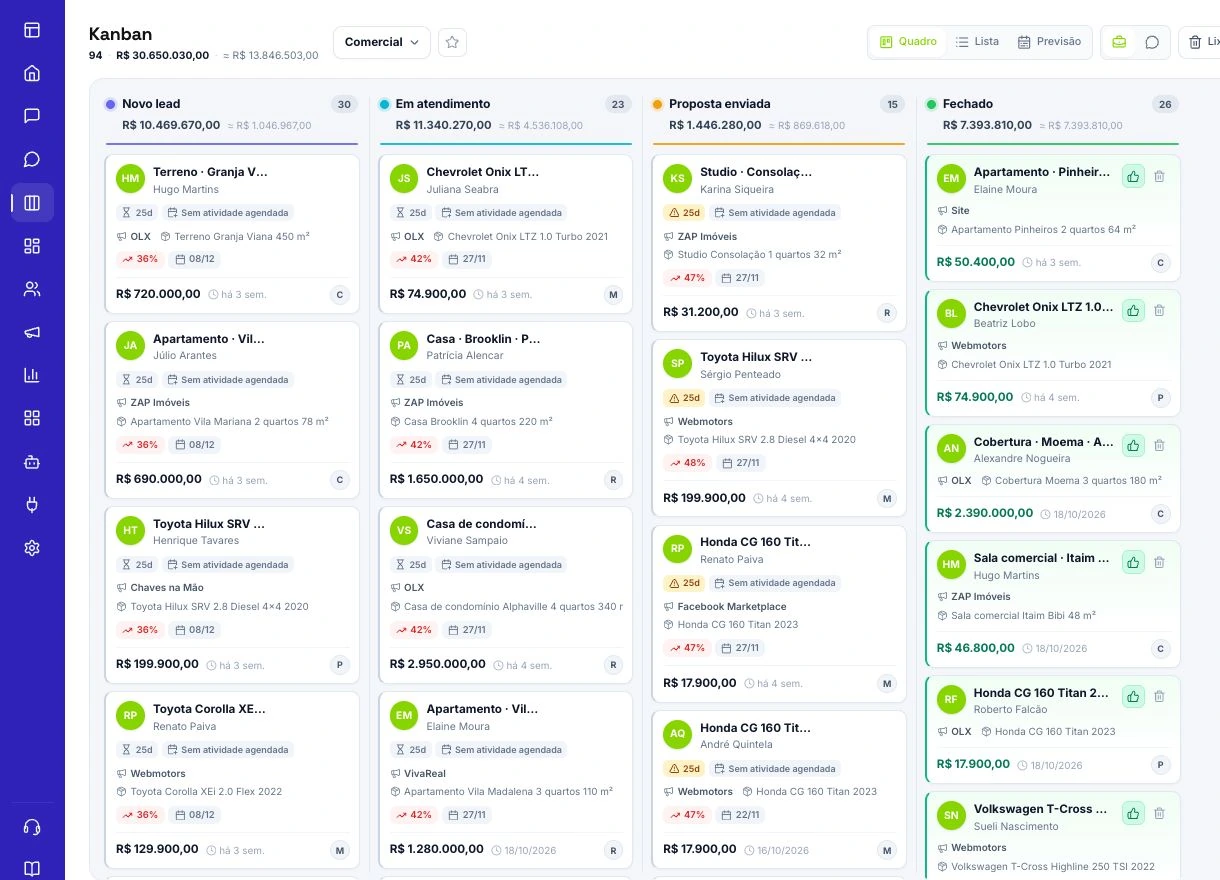
Define three operational outcomes. A request within the service area, involving compatible equipment and an understood need, goes to sales. An incomplete request remains in clarification. An out-of-scope request receives a clear explanation instead of becoming an artificially qualified opportunity. When a contact asks for a person, prioritize the handoff even if answers are missing. Qualification must not block access to service.
Choose Kanban stages matching these outcomes and explain in the instructions when to use them. Avoid an abstract rule such as 'qualify the best leads'. Your test must distinguish someone ready for a sales conversation from a pleasant exchange, an urgent issue or an out-of-scope request.
Write instructions you can actually verify
In Automations › AI agents, organize the instructions into purpose, questions, limits and handoff. A useful specification is: 'Identify equipment, city, problem and urgency; use information already provided; ask one question at a time; do not confirm prices or technician availability without a source; immediately transfer requests for a person.' In Automatic mode, use natural language rather than inventing bracketed commands.
Keep an approved list of equipment and service locations in the knowledge base. General customer service advice cannot replace these facts. Resolve conflicting service-area sources before activation. In Basic, review Transfer and select the queue, rotation or person that will actually receive the conversation. Writing 'send to sales' without configuring a destination is insufficient.
Agree on a minimum handoff summary: the need, confirmed details, missing information and next step. Also review the tools and permissions available to the agent. An instruction to update the CRM is useful only when the action is available within that company's context; a prompt is not evidence that an action occurred.
Ten tests before connecting qualification to the channel
Prepare ten scripts: a complete request, a one-word message, details provided out of order, an unsupported city, incompatible equipment, a price question, information missing from the knowledge base, a topic change, a request for a person and an opt-out. Reset context between cases in Test conversation so an earlier answer does not help the next case. Record expected and observed outcomes.
Check whether the agent repeats answered questions, turns assumptions into facts or attempts an impossible qualification. An internal test may show an action as 'Would do, not executed in the test'. This lets you review intent; it does not prove a transfer, card movement or sent message. Then run a controlled pass with a demonstration contact to verify the effects you authorized on the channel.
Set acceptance criteria beforehand: no invented commercial promises, human requests respected and correct destinations in every applicable case. A failure requires a correction and a repeated scenario even if the remaining wording is good. Assess decision quality and the CRM outcome separately from conversational fluency.
Use activity to fix the cause behind the wording
Open Activity on the agent card and compare the timeline with the conversation and CRM outcome. If an incorrect price appears, inspect the source used. If the knowledge is correct but the agent asks everything again, adjust the instructions. If the conversation is sound but the handoff fails, investigate the destination, tool availability and permissions. These are different problems requiring different fixes.
In a hypothetical example, forty conversations included twenty-five suitable prospects, and twenty reached a seller with the minimum information. Handoff completeness was 20 ÷ 25 = 80% of suitable cases, not of all contacts. If twelve of those twenty accepted the next step, advancement was 60% within that group. These figures explain the analysis; they are neither FunnelOps results nor targets. Review the five incomplete handoffs before increasing volume: a question may be missing, or the rule may demand information the customer cannot provide.