

Understand what the metric includes
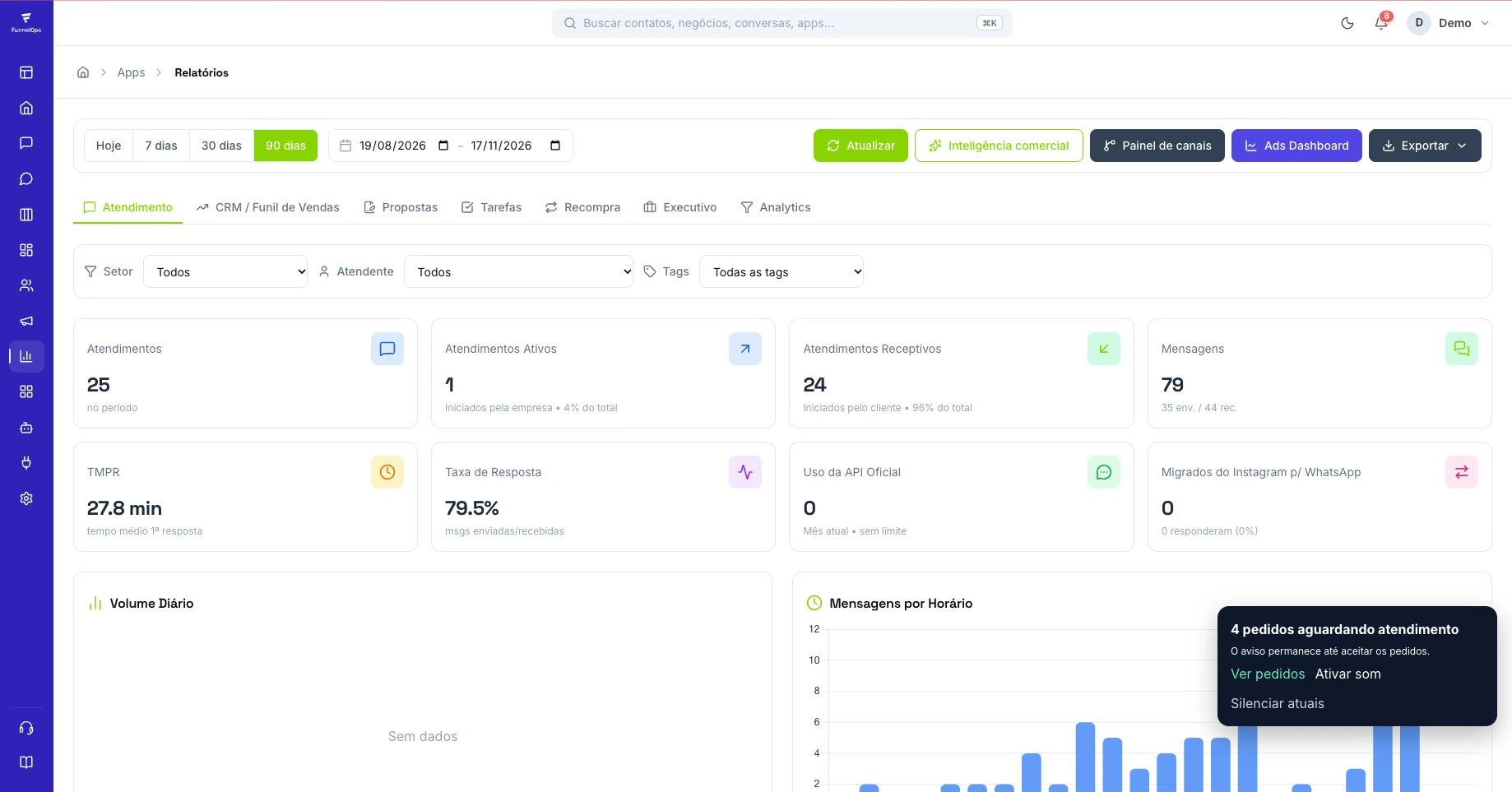
Before comparing results, understand the measurement rule. The metric considers the incoming message and the first reply sent, including replies from automation or AI. A shorter wait may therefore reflect a virtual agent answering first. To assess the complete experience, also review resolution, conversation continuity, and transfers. A quick greeting welcomes the customer, while the actual question still needs a useful answer that helps them take the next step.
Find the report in FunnelOps
Open Reports and select the Customer Service tab. Choose a period and use the Department, Agent and Tags filters to investigate the operation. Start with the overall result, then compare groups with similar working patterns. A team answering during business hours and a team receiving messages overnight face different conditions. Record the period and filters so the next review uses the same reference and supports a meaningful operational decision.
Locate the source of the queue
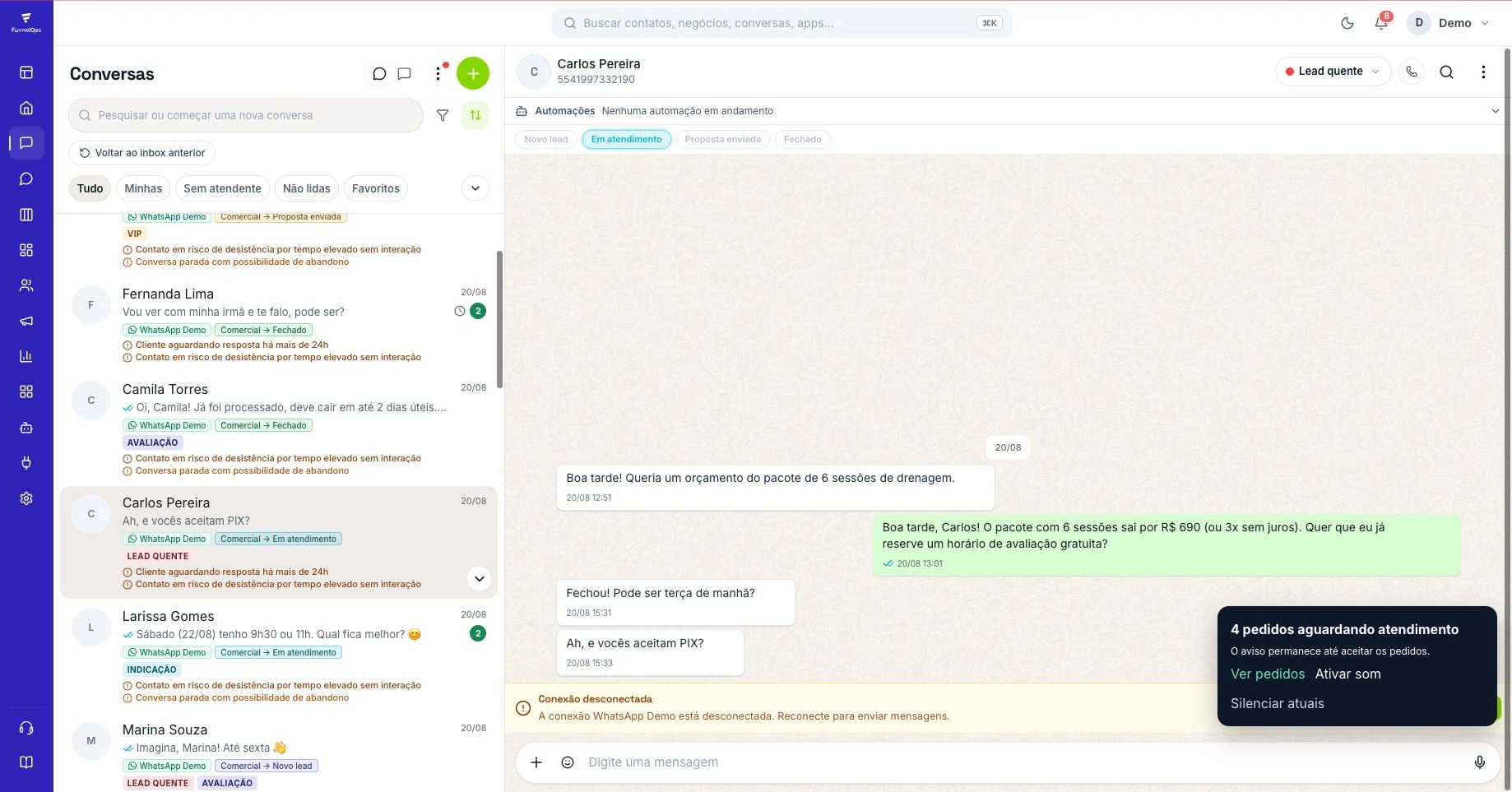
Review a sample of conversations with longer waits and examine what happened. Did they arrive outside business hours? Were they left without an owner? Did the customer go through several transfers? The Inbox helps distinguish capacity shortages from routing problems. Start with the most frequent cause. Adjusting an overloaded department or a transfer rule may improve the experience more than asking everyone to work faster without understanding the underlying issue.
Use AI for questions it can answer
In Automations, open AI Agents and prepare instructions, knowledge, and handoff criteria. AI can welcome customers, answer supported questions, and collect information for the next owner. Configure the queue or person responsible for requests outside that scope. Test straightforward questions, incomplete requests, and requests for a human before activation. The quality of the instructions and reference material influences how useful the first reply and subsequent messages will be.
Combine speed with context
When a human takes over, they should have the history, reason for contact, and information already provided. Avoid repeating questions the AI has just asked. If another department needs to help, explain the next step and keep someone responsible for following through. Clear messages reduce repeated requests for updates and help the queue move. Use recurring questions to improve the AI knowledge and team guidance with examples from actual conversations.
Build a review routine
Assign an owner to review results and repeat the analysis with the same filters. Check whether waiting times decreased and conversations reached the expected resolution. Consider customer feedback through reviews or surveys suited to your process. When an adjustment improves the result, document what changed and follow subsequent periods. The report then becomes a practical guide for routing, training, and configuration, supported by evidence the team can revisit.
Define the measurement boundaries before comparing teams
Before setting a target, write down what counts as a first response in your operation. An automated acknowledgment tells the customer that the conversation has entered the queue. Useful guidance may arrive later, when someone answers the question or explains the next step. Check which event the report measures and keep that definition consistent. This lets the team connect the number with the customer experience, including conversations handled by an AI agent.
Consider a repair business open from nine to six. A message received at six ten will reach the team the following day. Decide whether management reviews elapsed time or time within business hours, and display that rule alongside the result. In FunnelOps, open a sample of Inbox conversations and compare their timestamps with the selected service-report period. Separate test messages and unanswered conversations, since they require their own interpretation.
Reproduce the queue with three incoming scenarios
Run a small test before changing routing or automation. Use fictional contacts to simulate a simple sales question, a request for another department, and an after-hours message. Observe the entry queue, the person taking ownership, and the guidance the customer receives. If two people answer simultaneously or nobody takes responsibility, fix assignment and access before demanding faster replies.
In FunnelOps Inbox, make ownership clear and record the context needed for a transfer. When AI participates, prepare recurring answers and a handoff for requests requiring human review. Test an incomplete question and one outside the knowledge base. Expect either a coherent answer or a contextual handoff. After an automation runs, also check the actual message in conversation history and its delivery status.
Find the conversations hidden by the average
In an illustrative example, nine customers receive a reply in one minute and the tenth waits thirty-one. The average is four minutes, while one person has a very different experience. Review the longest delay and the distribution in a sample. If the available report does not provide a median or percentiles, checking selected timestamps still helps locate waiting time. Keep the sample size alongside the indicator.
Investigate by shift, department, and request type. One queue may receive complex requests while another handles quick questions. Account for context and staffing when comparing them. Open the slowest cases and record observable causes, such as transfers without context, shift-change backlogs, or missing information. Use the findings to review FunnelOps Inbox operations, the AI knowledge base, or process stages. Choose one concrete cause to address first.
Check whether faster replies improve service
After the adjustment, review a comparable week and what happens after the first reply. Count conversations receiving useful guidance, customers having to repeat questions, and transfers that stall. In sales, also check advancement to the next Kanban stage. A quick greeting followed by a long wait identifies a queue that still needs attention. Improvement should be visible across the full service journey.
Assign an owner for reviewing unanswered cases and define a simple routine for finding them. This can be a manual queue check at agreed times using the team's available tools. At the end of the period, compare volume, staffing, and request types before attributing the result to your change. If response time falls while complaints rise, read the conversations and revise the answers. Use AI to expand useful guidance with supervision and updated knowledge.