
Domain, social profile and now user name in WhatsApp: the digital identity of a brand has earned an asset that deserves more protection. Meta has started the early booking of usernames so that people, creators, companies and organizations can choose an identifier before the resource's wide launch.
The change is relevant because WhatsApp has always had the phone as the main public key. With the user name activated, new contacts will be able to find an account by its exact name and start a conversation without the number being shown immediately on the first contact.
For a company, username is not just a nice name. It can become an entry point for campaigns, attention and sales, and needs to be born connected to CRM, brand government and security.
What is the username of WhatsApp?
It is a unique identifier associated with the account, similar to that already exists in other networks. The difference for the profile name is simple: several companies may display a similar name, but each reserved username belongs to one account.
According to Meta's official announcement, the functionality will be optional and will be released gradually. There will be no public directory or account suggestions: to start the contact, the person will need to know the exact username. An optional key is also provided to control who can send the first message using the identifier.
How to book your brand username
Before you start, update WhatsApp to the latest version. The interface may vary between iPhone, Android and account types, but the advertised route is Configuration Account User Name. Si la opción aún no aparece, espere la liberación gradual.
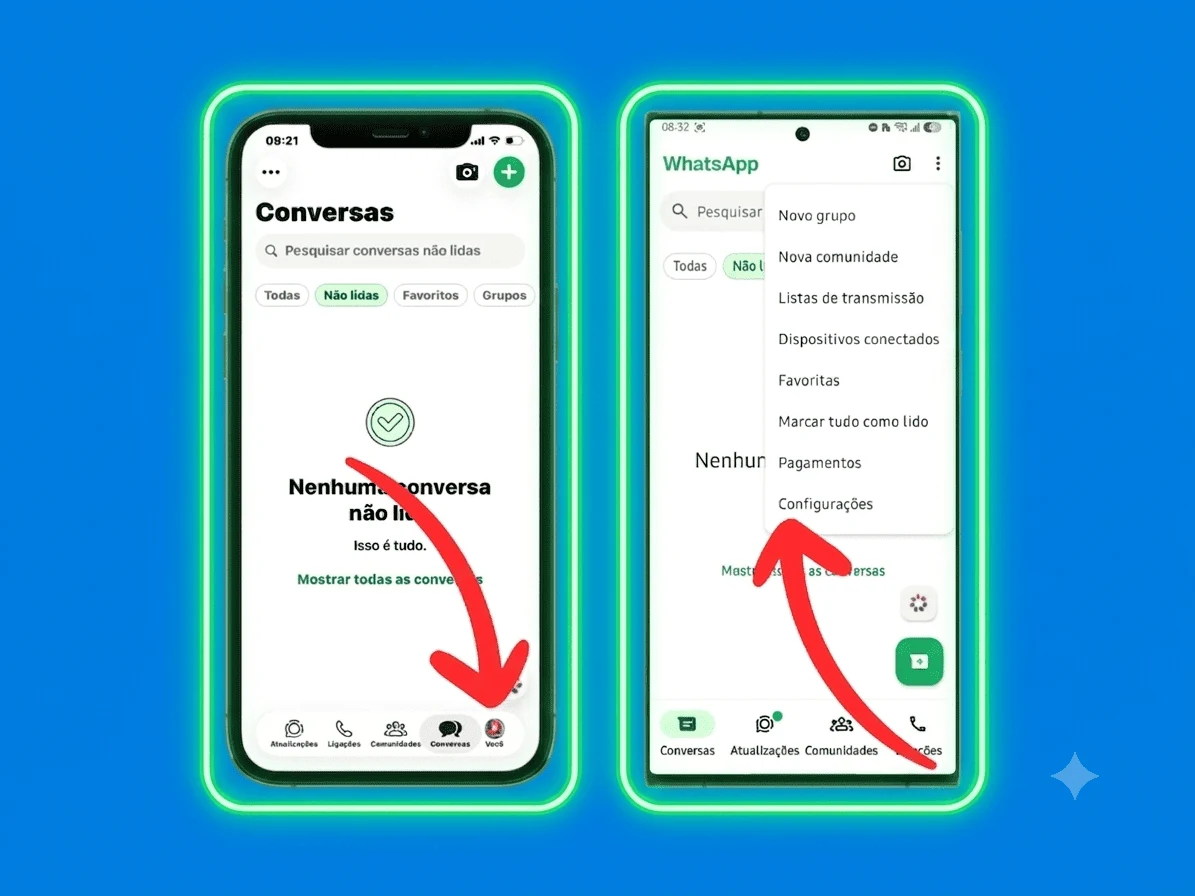
1. Open the settings
On the iPhone, tap Configuration On Android, open the three-point menu and tap Configuration.
2. Log in and select Username
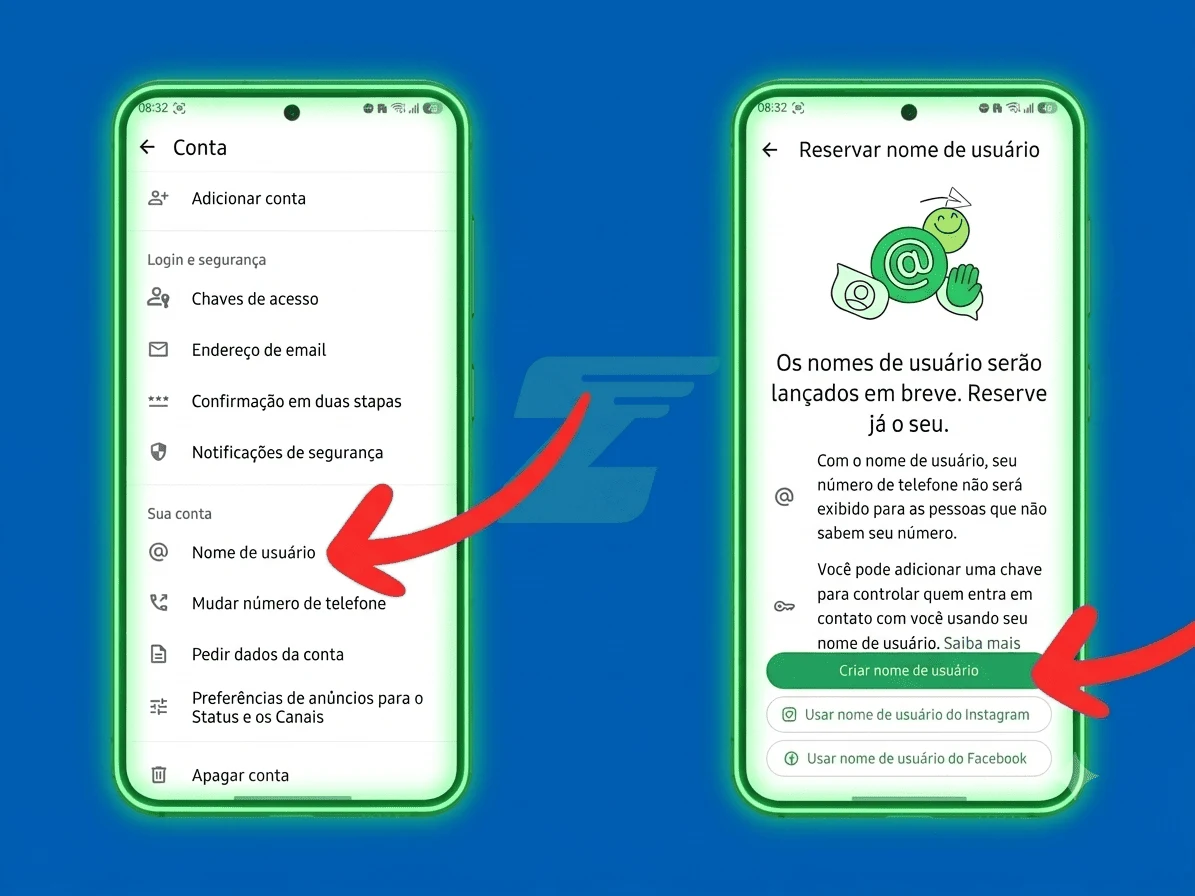
In the configuration, open Account. Cuando la función esté disponible, la opción User name will appear on this screen. Tap on it and choose Create username.
3. Write the desired name
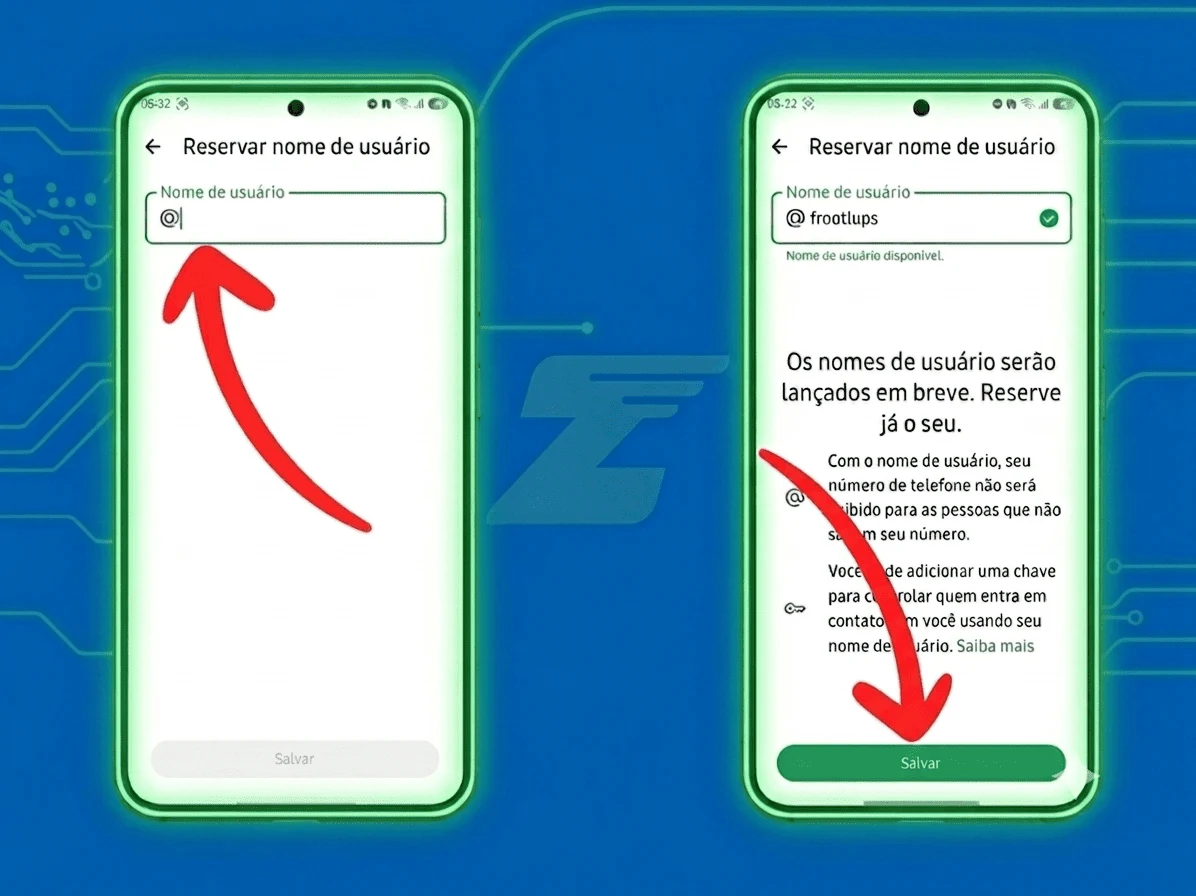
Choose a short, easy to speak and consistent identifier with the company's domain and other official profiles. The app will inform you if the name is available. Avoid meaningless numbers, hard fonts and abbreviations that the customer would not recognize.
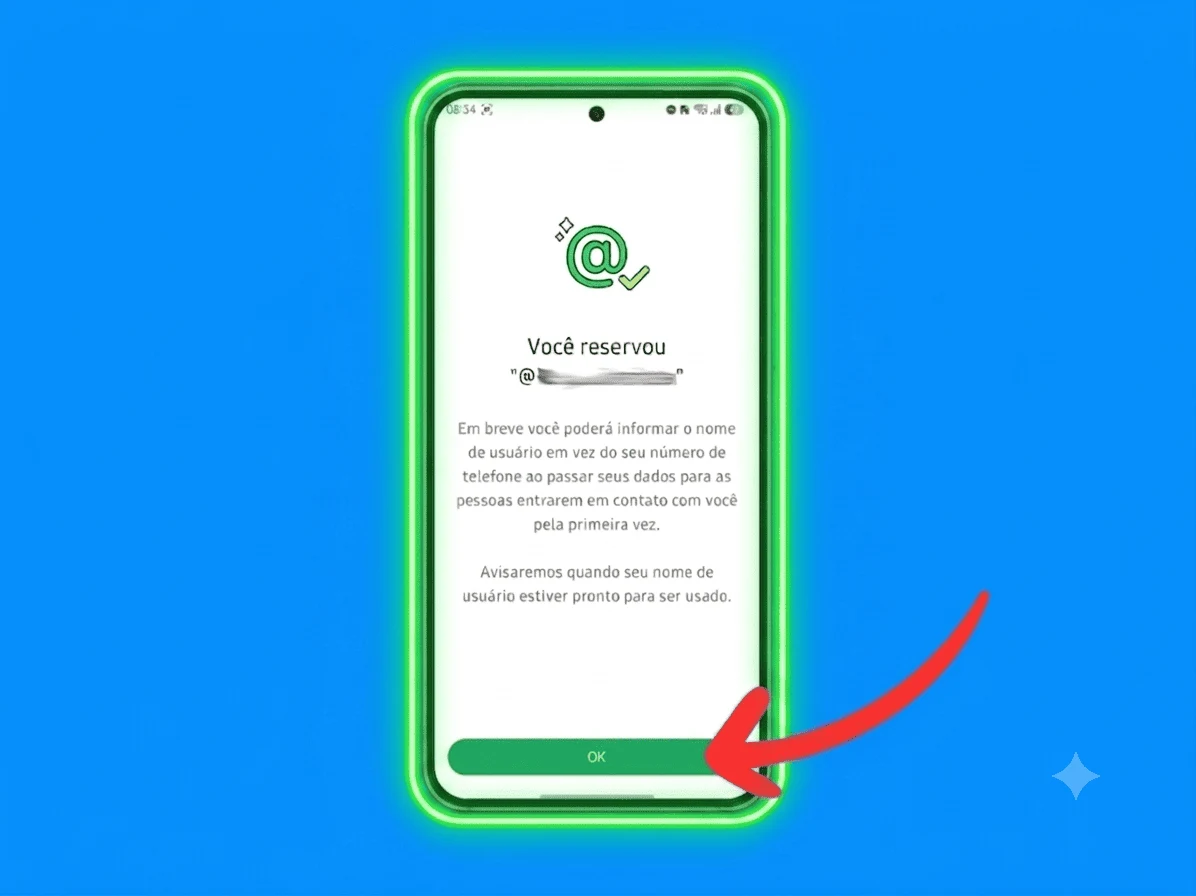
4. Confirm your reservation
When saving a name available, WhatsApp will show the confirmation of the reservation. Register internally which account the identifier received, who made the configuration and which people have administrative access.
How to choose a good username for the company
The best name is not always the most creative. For a commercial operation, clarity is usually best. Use this order of preference:
- Exact name of the brand: the easiest option to recognize and disclose.
- The same social media identifier: Reduces doubt and increases consistency.
- Brand with category or location: useful when the main name is not available, as long as it remains short.
- Institutional variation: Terms such as official should only be used if they are actually part of the brand's communication.
Meta reported that creators, small businesses and eligible organizations will be able to claim on WhatsApp the username already used on Instagram or Facebook. If this option appears, it may be the best way to maintain the same identity across the ecosystem.
| Prefer | Avoid | Why? |
|---|---|---|
| Brand name | nombre_de_marca_2026 | Less characters and less chances of error. |
| Equal identity in networks | A different name in each channel | The customer recognizes the operation more easily. |
| Natural chart | Confused changes in letters and numbers | Facilitates audio, video and telephone broadcasting. |
| Name with governance | Personal account of collaborator | Reduces the risk of loss of access and internal dispute. |
Does the username replace the WhatsApp number?
Not immediately. The number remains part of the account structure, while the user name functions as a public layer of identification and discovery. The main change announced is that when the feature is active, a new contact will not see the phone in the first conversation if the User name is enabled.
For companies, the safest strategy during transition is to keep current channels running. WhatsApp links, QR codes and disclosed numbers should not be deleted until the user name is available, tested and integrated into the operation.
What changes in CRM and automations
Many integrations use the phone to locate the customer, open a call or update an opportunity. When the user enters the flow, it must be treated as a new aliases of the same identity, not as an automatic reason to create another contact.
In FunnelOps, the operational logic is to centralize what really matters: origin of the lead, history, responsible, passage of the funnel, labels, tasks and automations. Thus, the customer can arrive by a new identifier without losing the context built on the other channels.
- Single registration: associate user name, phone and other identifiers with the same contact when there is secure confirmation.
- Origin of the campaign: Register if the conversation came from advertising, QR code, website, event or organic disclosure of.
- Route: Send new contacts to the right industry without depending on manual classification.
- Centralized History: It maintains conversations, proposals, charges and follow-up even if the door of entry changes.
- Context automation: Use CRM data to qualify, respond and advance in the lead without creating a generic experience.
Security: Protect the name and teach the customer to recognize the brand
The user name improves privacy, but does not eliminate imitation attempts. Variations with points, similar letters or words such as support and financial support can be used to deceive customers. Book the legitimate name early and clearly communicate what your official channels are.
- publish the user name in the official domain of the company;
- maintain the same visual and textual identity in legitimate profiles;
- Orient the team to requests that should never be made by message;
- establish a procedure for receiving complaints from similar profiles;
- register account account holders, accesses and recovery;
- monitor the attempts at personification and respond quickly.
The new identifier also does not replace consent, transparency or good data protection practices. The company remains responsible for processing the customer's information in accordance with the informed purpose and applicable legislation.
Release Checklist for your brand
Did you book the name? Before placing it in all campaigns, do a controlled implementation:
- confirm the reservation in the correct business account;
- document the user name and those responsible for access;
- test how a new contact finds and starts the conversation;
- validate the creation and deduplication of contact in the CRM;
- configure origin, labels, tail and initial step of the funnel;
- Review automatic responses, chatbot and transfer to attendees;
- update the website, bio, email subscription, ads and QR codes;
- Keep the phone as an alternative during the transition;
- It accompanies conversion, duplicate contacts and customer doubts.
A simpler gateway requires a more organized operation
An easy to remember can reduce friction and increase the number of conversations started. But real gain appears when the company knows what to do after the message arrives: identify the lead, understand the origin, direct attention and drive the opportunity to the next step.
At this point you will find the username and CRM. WhatsApp creates a new way for the customer to find the brand; FunnelOps keeps each conversation connected to the history, funnel and automations that transform interest into relation and sale.
Do you also want to understand the risks of falsification and the care of digital identity? Read the article about First big test of the usernames in WhatsApp.
Prepare your operation to receive leads for the new username
Centralize contacts, conversations, origins, automations and business steps in a CRM built to follow the evolution of WhatsApp.
Talk to a specialist →Published by the FunnelOps team · 01 Jul 2026