Choose the right reason to reconnect
Start with the timing agreed with the customer. Record Friday if that is when they asked you to return. Without an agreed date, consider the sales stage and complexity of the purchase. A simple quotation might need a quick clarification, while a decision involving several people may take longer. Read the latest interaction and identify the outstanding question before writing. This prevents you from asking again for information the customer has already provided.
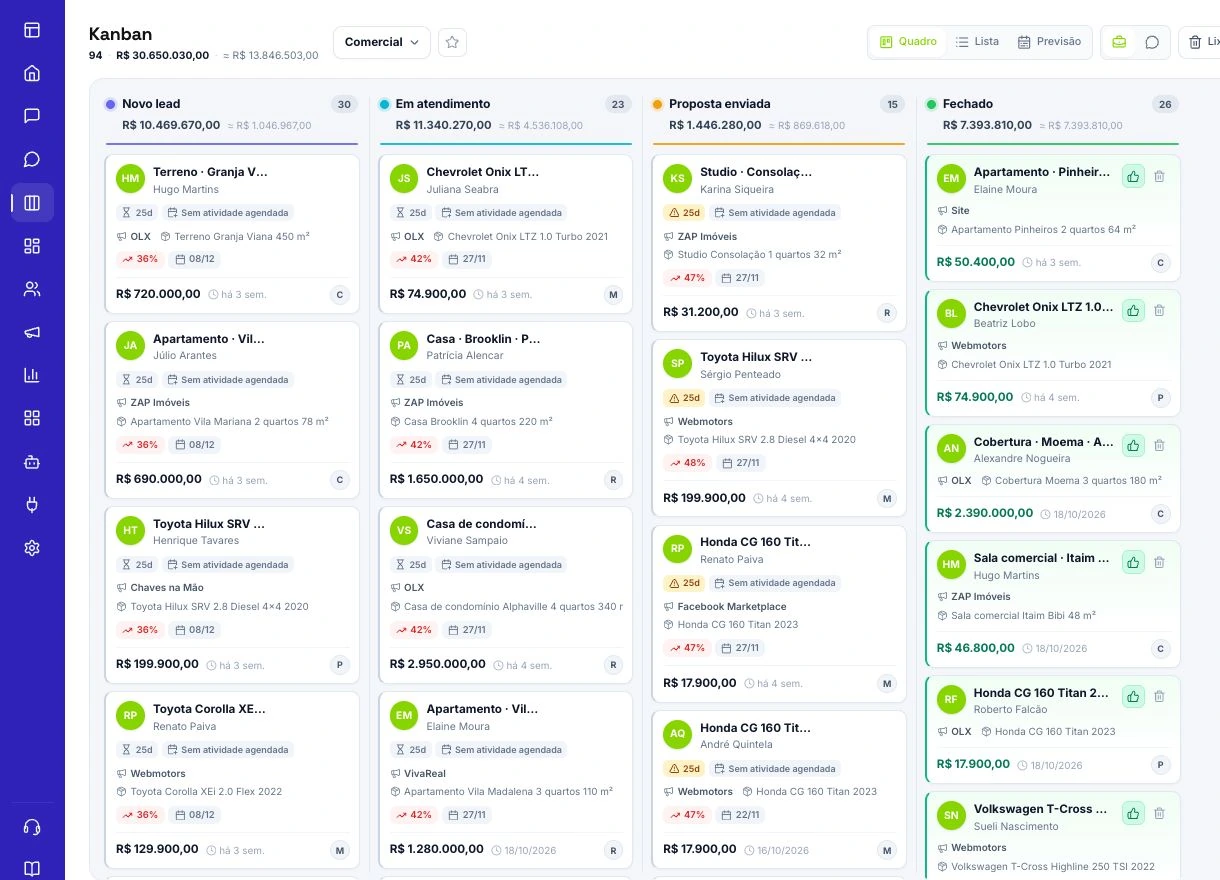
Organize the opportunity in Kanban
In FunnelOps, keep each opportunity in the stage that reflects its actual state. Use Proposal sent when a real proposal exists, and record the value, owner and open questions. The conversation history should let another team member understand the situation. Separate deals with an agreed return date from deals with no next step. Address overdue commitments and questions blocking a decision first. Your pipeline then becomes a practical sales work queue.
Build the follow-up in Workflows
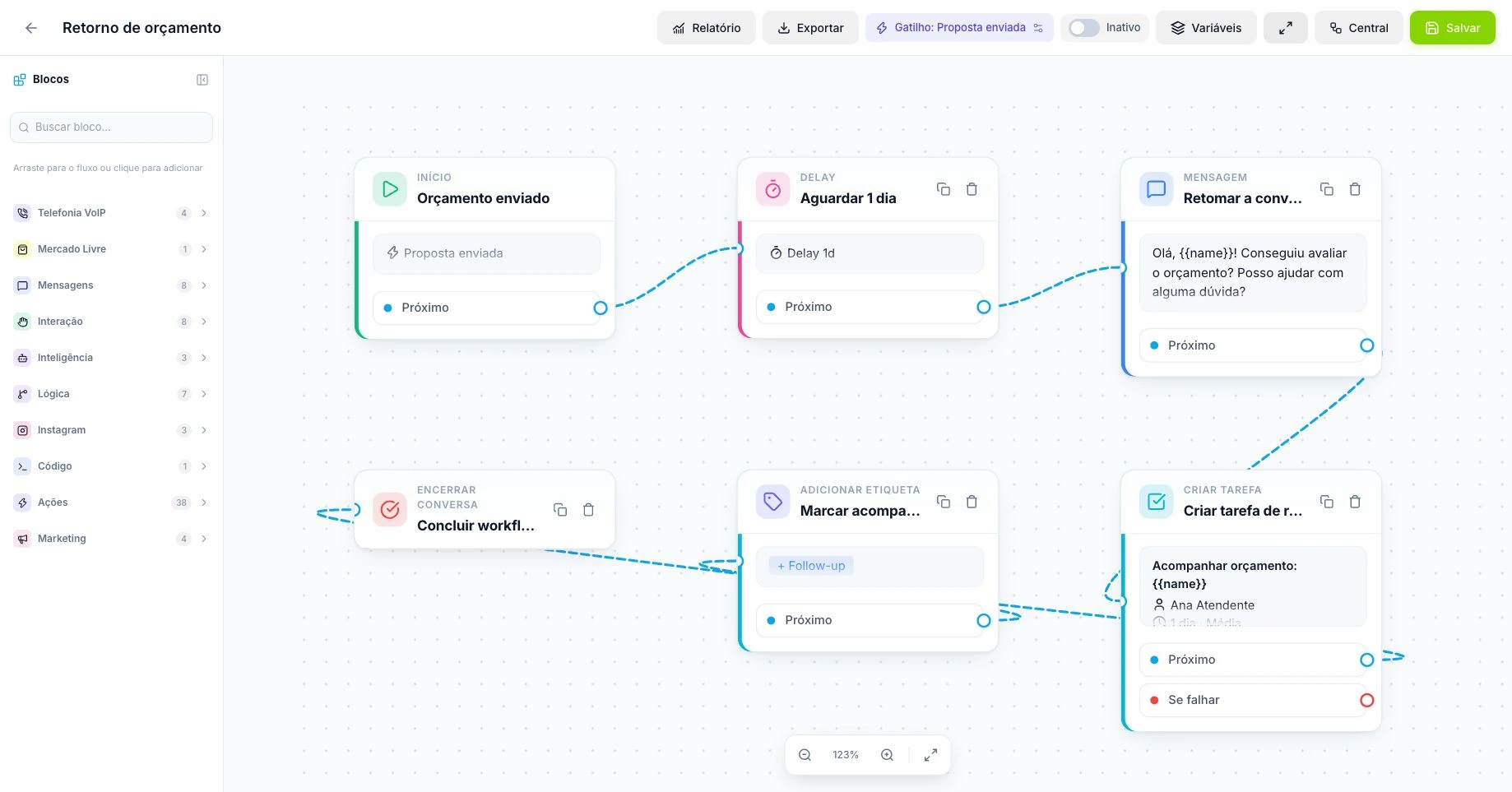
Open Automations and select Workflows. Choose a trigger suited to the process, such as a card entering a stage or a tag being added. Use Delay to set the interval and Wait for response when the next step depends on the contact replying. Give the Replied and Did not reply branches different purposes. Test with a demonstration contact to check timing, message, conversation association and routing before activating the workflow for your team.
Coordinate AI and human follow-up
The AI agent can provide contextual follow-up according to its configuration. Decide which process owns each situation so that two automations do not chase the same reply. When a person takes over, the seller should understand the next action. Test replies, stop requests and deal closure as well as silence. With the official WhatsApp API, reopening contact outside the applicable window requires an approved template appropriate to the message. Include its category rate in your planning.
Measure useful progress through the sequence
Track replies, proposals that move forward and requests to stop contact. Compare similar periods and sales stages. When conversations consistently stall after a quotation, review the clarity of the offer and the questions customers keep asking. If timing is the issue, adjust scheduling and ownership. A weekly review should produce a concrete process change. A useful sequence helps customers make decisions and keeps the team organized instead of simply increasing the number of outgoing messages.
When to end the sequence
Decide in advance when further attempts stop being useful. A refusal, an opt-out request, or confirmation that a project has been postponed should lead to closure or a newly agreed date. Record the outcome in the CRM so another person can understand the context. Then check that the contact has left the relevant sequence. This keeps the history useful and prevents different automations from unnecessarily reopening the same subject.
Build a proposal sequence with a defined start and finish
Use a concrete case: a fictional company sent a maintenance quotation and agreed that the buyer would review it on the next business day. In Kanban, verify that a real proposal, owner and outstanding issue exist before moving the card into the selected stage. In Automations › Workflows, create the stage-entry trigger. Give the workflow a name identifying the process and keep it inactive during configuration review.
Connect a Delay matching the agreed timing, a follow-up message and a Wait for response block. The message should revisit the actual outstanding issue, such as a scope question, rather than forcing the customer to reconstruct the negotiation. On Replied, end the sequence or hand the case to its owner. On Did not reply, choose between a relevant final attempt and closure.
Review every branch destination, associated contact and selected channel. A drawn connector does not establish that a condition is correct. The pilot should verify that the right message reaches the demonstration contact with the right context, and that the seller can find the conversation when taking over.
Configure exits so completed deals are not chased
In the trigger dialog, review Exit workflow when…. Depending on the trigger and selected rule, a waiting execution can stop when the contact replies, the card leaves its stage, a tag is removed, the deal is won or lost, or the conversation is closed. For proposal follow-up, leaving the stage and completing the deal help prevent reminders that no longer have a purpose.
Choose deliberately how a reply is handled. If it should end the entire sequence, use that exit rule. If it must follow the waiting block's Replied branch to perform a specific action, validate that route without a rule ending it beforehand. Similar instructions can create different paths; document which represents the team's intended process.
Also test two automations that might reach the same contact, such as one triggered by a stage and another by a tag. Decide which owns the commercial follow-up and remove overlap. AI pausing when a person takes over a conversation does not establish that every independent workflow has stopped.
Test silence, replies and state changes
Reserve demonstration contacts for five paths: no reply; a reply during the wait; the seller moves the card; the deal closes; the contact asks you to stop. Record the start time, stage, exit conditions and latest observed event for each. Use short intervals only in the dedicated test environment and restore commercial timing before activation.
In the history, distinguish a rule-based exit from a failure or completion through another path. If a reminder appears after a sale, first check for multiple executions, whether the correct card moved and whether the rule was active. If nothing was sent, inspect the destination, connection and entry condition before adding more attempts.
A processed execution proves workflow progress, not message delivery. Separately check the send record in the conversation and the states available from the channel. With the official API, following up outside the 24-hour customer-service window requires an approved template matching the message’s purpose. The pilot must include the condition in which you actually intend to operate.
Turn the weekly review into a sequence decision
In a hypothetical example, forty eligible proposals entered the sequence; thirty-six had a recorded send, twelve received a reply and five advanced to negotiation. The reply rate was 12 ÷ 36 = 33.3% of recorded sends. Advancement was 5 ÷ 40 = 12.5% of eligible proposals. These use different denominators; report both and do not describe a processed attempt as a delivered message.
Classify stalled cases by price, scope, timing, incorrect contact or a postponed project. If scope questions dominate, improve the proposal and follow-up content. If messages precede the agreed date, correct the Delay. If someone received two sequences, fix entry conditions before changing wording. Compare groups given enough time to decide and change one variable at a time. The review is useful when it produces an identifiable correction while preserving the agreement with the customer.